How to use Unwind QR Codes?
Welcome to the future. At Unwind, we are not just repairing your cells, we are also future-proofing you.
To take total control of your experience, we encourage you to use the QR codes posted around our facility.
Why do this?
✅ Out-the-Door Booking: Scan the code on the modality room door as you leave to instantly book your next session.
✅ Info On Demand: Specific information when you want it and need it.
✅ No Waiting, Period: No Emailing, No Texting, No calling, no waiting on hold.
✅ Instant Bio-Wisdom: Scan room posters to send the clinical science and data straight to your device.
✅ Retail on Demand: Want an RLT Portable? Scan to drop the brochure and live pricing right into your hand.
✅ Screen-to-Session: Scan the QR codes on our commercials to instantly grab a Day Pass or membership.
Here is exactly how you do it: 1, 2, 3 It's easy...
- Open your phone or tablet camera.
- Point it at the QR Code and wait for the Yellow Bar to pop into view.
- Tap the Yellow Bar.
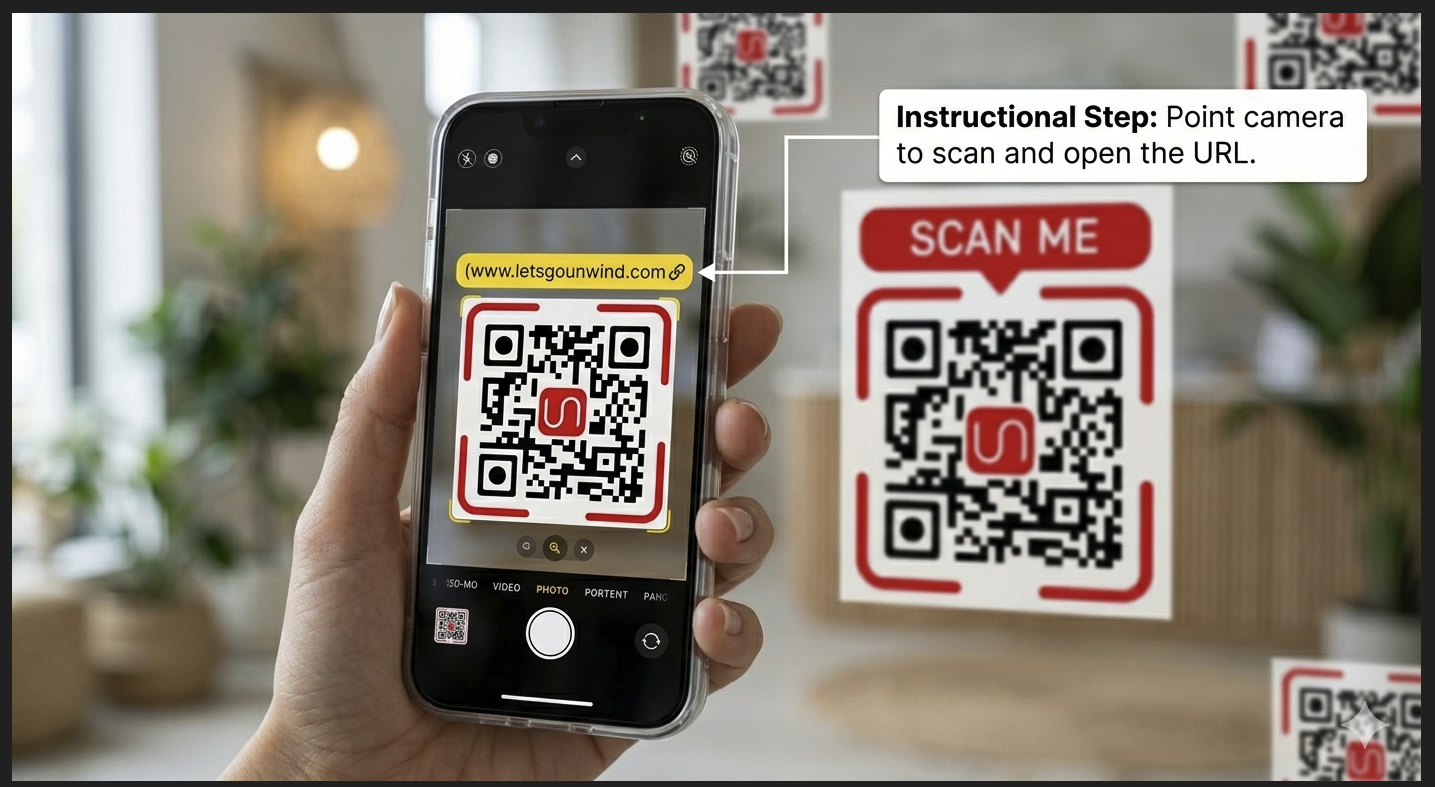
Do not take a picture. We are not taking photos; we are interacting with the them.
See No big deal. Just another successful day at Unwind. Stay in charge.